![25_PMX Logo.jpg]](https://help.portfoliometrix.com/hs-fs/hubfs/25_PMX%20Logo.jpg?height=40&name=25_PMX%20Logo.jpg)
Upon being notified of the name change , please request a valid CIPC document that indicates the name change.
Once received , inform the relevant departments via the below asana boards:
-
Operations - so that they can link the new FSP name to Coruscate
Link - https://app.asana.com/1/919311197424/project/1210013090240025/list/1210013351496401
2. Compliance - so they can check if we need additional compliance documentation
Link - https://app.asana.com/1/919311197424/project/1212659287005335/list/1212628795239562
Then PRS has to update the company name in the below places
1. Hubspot
Search for the old company name under the company tab , once found , click on it to open the company information.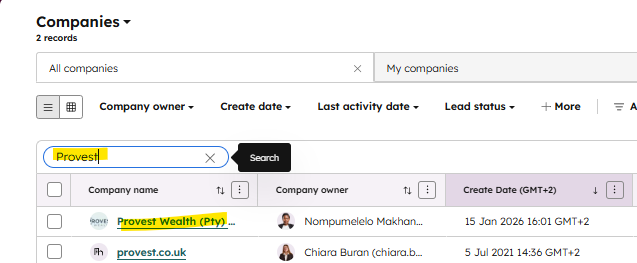
Once open , click on the pencil next to the company name. This will open up the company name field for editing , change the company name as per the CIPC document mentioned above and close.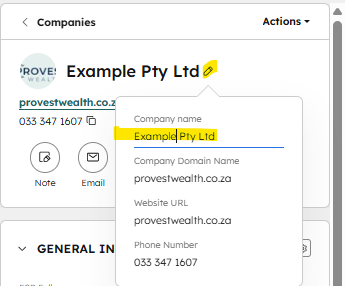
If the company has a new website URL , you'll update the link by following the same process above.
2. Advisor Company Settings:
Open Wex and go into admin mode by clicking on settings and selecting "Admin Mode"
Under settings select "Adviser Company General Settings"

Filter for the Adviser Company and search for "Name". Then change the Full name, Short name and OutputDefaultFileName to the new name.
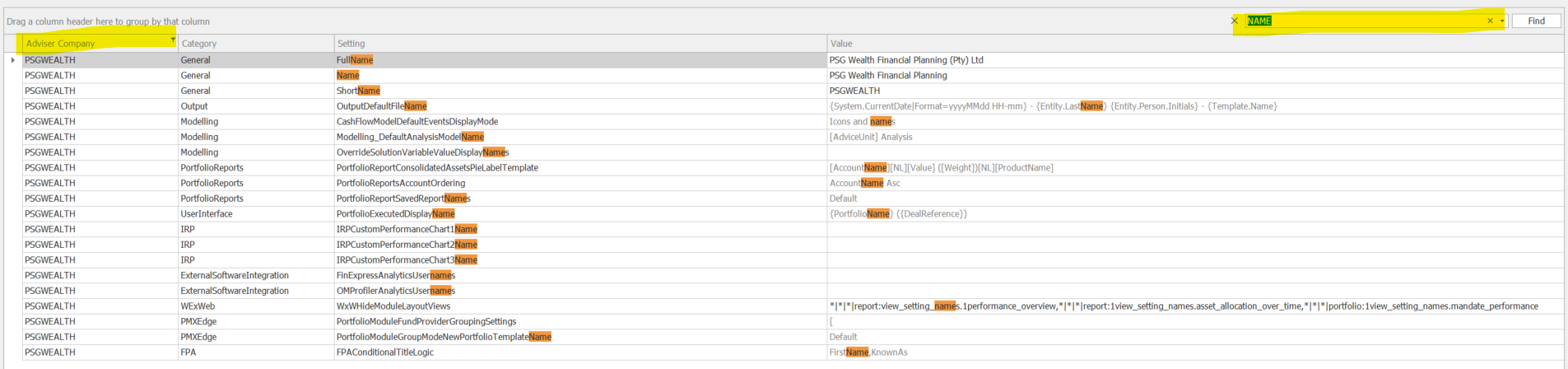
If the FSP number is also changing, then look for FS in the search bar. Change the FSNumber if applicable.
